Check theme compatibility
TValue: Wishlist automatically checks your theme after installation. This helps the app decide whether wishlist features can be placed automatically or whether your theme needs additional support.
Fully supported themes
When your theme is fully supported, TValue: Wishlist can automatically add and manage the main wishlist experience after TValue: Wishlist Core is enabled.
Fully supported themes can use features such as:
- Product page wishlist button
- Collection page wishlist button
- Wishlist popup or wishlist page
- Floating button
- Wishlist header button
- Wishlist toast
- Require login popup
- Save wishlist contact popup
This is the expected setup path for most stores.
If your theme is fully supported, wishlist placements can work automatically after TValue: Wishlist Core is enabled and saved.
Themes that need additional support
If your theme is not fully supported yet, the app can still run, but some automatic placements may not match your storefront correctly until a theme preset is prepared.
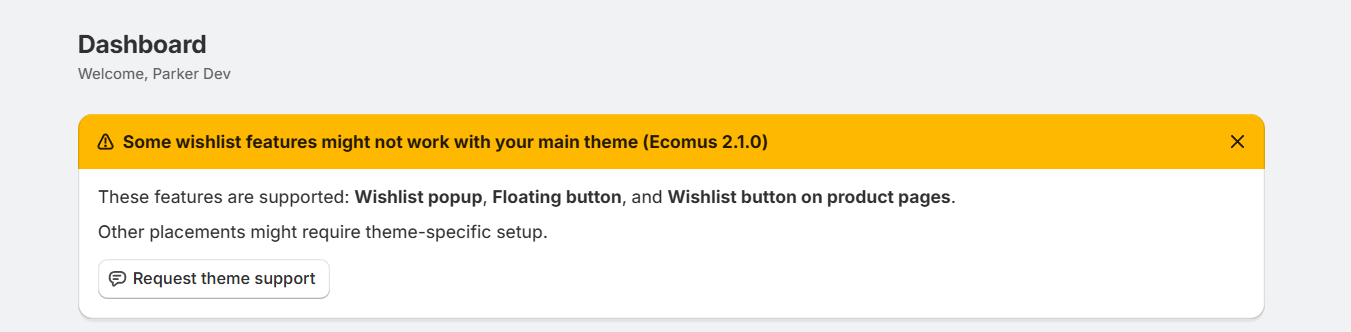
When your theme needs additional support, TValue: Wishlist shows a banner in the app with the placements that are currently supported. The Request theme support action is available if you want to contact us directly, but theme support does not depend on you sending a request.
The placements most affected are:
- Wishlist header button: may not appear automatically.
- Collection page wishlist button: may not appear automatically.
- Product page wishlist button: may appear, but the placement or styling may not fully match your theme design.
Other wishlist features are not directly blocked, but they work best when the main wishlist entry points are placed correctly.
TValue detects when a store uses a theme that needs additional support. After the app detects it, our team can prepare support for the theme so your store can use the wishlist experience normally.
Theme support is usually a small preset update. After we detect a theme that needs support, preparing the preset typically takes about 5-10 minutes.
Advanced option: Custom placement
If needed, you can manually place wishlist buttons with Custom placement.
Custom placement can be used for:
- Product page wishlist buttons
- Collection page wishlist buttons
- Wishlist header buttons
This option is intended for advanced users, developers, or theme partners. Most merchants should not need to use it during normal setup.
Recommended next step
After checking your theme, continue with Verify your wishlist setup.